
93 Turing Matrix
Turing Machine sequencer with a switchable mixer layer inspired by the Music Thing Modular Turing Machine and Vactrol Mix combination
Panel
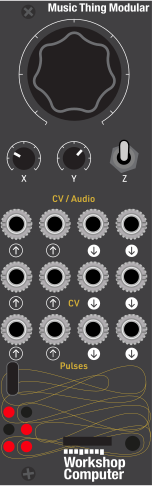 Random /
Write MixerLoop Length
Mixer DepthDiv / Mult
Mixer DepthAudio Out 1Audio Out 2CV In 1CV In 2Ext Clock 1Ext Clock 2Audio Out 1
Pass-throughAudio Out 2
Pass-throughChan 1 Quant
CVChan 2 Quant
CVChan 1 PulseChan 2 Pulse
Controls
Random / Write Mixer
Drives the main Turing machine write behavior in middle mode and sets mixer lag in up mode
Loop Length Mixer Depth
Sets channel 1 sequence length in middle mode and mixer depth 1 in up mode
Div / Mult Mixer Depth
Sets channel 2 divide/multiply clock relationship in middle mode and mixer depth 2 in up mode
Inputs
Outputs
Audio Out 1
Audio pass-through in middle mode; mixed audio output 1 in up mode
Audio Out 2
Audio pass-through in middle mode; mixed audio output 2 in up mode
CV In 1
Divide/multiply modulation in middle mode; mix input 1 in up mode
CV In 2
Pitch offset in middle mode; mix input 2 in up mode
Ext Clock 1
Replaces tap tempo and drives the main Turing clock
Ext Clock 2
Independently clocks channel 2 when patched
Audio Out 1 Pass-through
Audio pass-through in middle mode; mixed audio output 1 in up mode
Audio Out 2 Pass-through
Audio pass-through in middle mode; mixed audio output 2 in up mode
Chan 1 Quant CV
Quantized pitch CV in middle mode; crossfaded CV output 1 in up mode
Chan 2 Quant CV
Quantized pitch CV in middle mode; crossfaded CV output 2 in up mode
Chan 1 Pulse
Clock or Turing-bit pulse behavior depending on pulse mode configuration
Chan 2 Pulse
Clock or Turing-bit pulse behavior depending on pulse mode configuration
LEDs
Z middle: Channel 1 DAC Level; Channel 2 DAC Level; Channel 1 Turing Level; Channel 2 Turing Level; Pulse 1 Activity; Pulse 2 Activity.
Z up: Mixer position 1; Mixer position 2; Mix depth 1; Mix depth 2; Pulse 1 Activity; Pulse 2 Activity.
README
Turing Matrix
This is a beta Workshop Computer card built from the official 03_Turing_Machine firmware, reshaped into two switch-selected layers inspired by the Music Thing Modular Turing Machine + Vactrol Mix Expander combination.
The card builds on ideas and code originally developed by Tom Whitwell and Chris Johnson. Their work on the Turing Machine family and mixer concepts is the foundation this beta card is based on.
The original Vactrol Mix Expander is a four-input, two-output vactrol matrix mixer for the hardware Turing Machine. On the Workshop Computer we have two audio inputs, two CV inputs, two audio/CV outputs, two CV outputs, and two pulse outputs, so this card treats the idea as a two-input, two-output random matrix/mixer.
Basic idea
- Z middle is the Turing control layer and is intended to feel like the original Turing card.
- Z up is the mixer layer and uses the card's Turing-style control signals to animate a two-input, two-output audio/CV mixer.
- Z down remains tap tempo.
- Pulse Out 1 and Pulse Out 2 keep the same clock/Turing pulse behavior in both layers.
- CV Out 1 and CV Out 2 stay quantized pitch outputs in
Z middle, and become mirrored crossfaded CV outputs inZ up. - On startup the active layer reads the physical knob positions directly; pickup only applies after switching between layers so the controls do not jump when you return to a layer.
Controls
Z middle
- Main knob: Turing randomness / write amount.
- X knob: loop length.
- Y knob: channel 2 divide/multiply relationship.
Z up
- Main knob: mixer lag / slew time.
- X knob: mix depth 1.
- Y knob: mix depth 2.
- Audio/CV In 1 and 2 are the mixer inputs. The audio inputs can also be used as slow CV sources.
LED feedback
- Z middle keeps the inherited Turing-style LED view.
- Z up switches the brightness LEDs to mixer feedback.
- Z down is tap tempo when no external clock is patched.
Inputs
- Pulse In 1: external clock for the main Turing channel.
- Pulse In 2: independent clock for channel 2.
- CV In 1: divide/multiply modulation for channel 2 in
Z middle, mix input 1 inZ up. - CV In 2: quantized pitch offset in
Z middle, mix input 2 inZ up. - Audio/CV In 1: mixer input 1 in the mixer layer.
- Audio/CV In 2: mixer input 2 in the mixer layer.
Outputs
- Pulse Out 1: matrix gate 1.
- Pulse Out 2: matrix gate 2.
- CV Out 1: channel 1 quantized pitch CV in
Z middle, crossfaded CV output 1 inZ up. - CV Out 2: channel 2 quantized pitch CV in
Z middle, crossfaded CV output 2 inZ up. - Audio Out 1: direct audio pass-through in
Z middle, mixed audio output 1 inZ up. - Audio Out 2: direct audio pass-through in
Z middle, mixed audio output 2 inZ up.
Quickstart
Try this as a first patch:
- Tune oscillator 1 and oscillator 2 to a fifth interval.
- Patch the two oscillators into
Audio In 1andAudio In 2. - Patch
Audio Out 1andAudio Out 2to two mixer channels and pan them hard left and right. - Switch to
Z up. - Turn
XandYto maximum. - Listen first without any CV patched so you can hear the basic stereo mix movement.
- Patch Slopes output to
CV In 1andCV In 2and set Slopes to a slow loop. - Patch
CV Out 1andCV Out 2to the pitch inputs of oscillator 1 and oscillator 2. - Listen on headphones and adjust the Slopes speed to hear the changes more clearly.
Mixer behavior
In the mixer layer, the card uses the Turing-style control signal as a crossfade driver. Audio Out 1 crossfades Audio In 1 against Audio In 2, and Audio Out 2 crossfades Audio In 2 against Audio In 1.
The same crossfade is mirrored on the CV pair: CV Out 1 crossfades CV In 1 against CV In 2, and CV Out 2 crossfades CV In 2 against CV In 1.
Status
Beta implementation. The firmware source is copied from card 03_Turing_Machine with:
- the internal card number changed to 93
- the original Audio In 1 reset behavior removed
- the original Audio In 2 switch override behavior removed
- a new
Z upmixer layer added alongside the Turing control layer - startup knob values applied directly to the active layer, with pickup only applied after layer changes
Web editor
The local web/ editor allows acces to the Turing settings plus the mixer-layer settings: timing,
scale/range, pulse behavior, mix curve, lane link, rise/fall timing, and per-lane minimum/maximum
windows. The panel still handles the live lag and mix depth gestures in Z up.
The hosted editor is here:
https://tomwhitwell.github.io/Workshop_Computer/programs/93-turing-matrix/web/index.html