
90 Pantograph
Pantograph lets you trace a performance on the X and Y knobs (e.g. oscillator pitch + filter cutoff), record it, then loop it back out the two CV outputs at variable speeds. Switch UP auditions live; hold DOWN to record (monitored, so you hear it as you play); release to MIDDLE and it loops exactly that length. The Main knob sets playback speed: centre = freeze, left = reverse, right = faster. Patch a gate into PULSE IN 1 and MIDDLE becomes a triggered envelope; unpatched it free-loops. PULSE OUT 1 fires a trigger at the end of a recording. PULSE OUT 2 runs a gate from the shape of the recording.
Panel
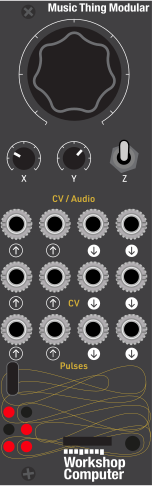 SpeedTrace XTrace Y(unused)(unused)X ModY ModTrig(unused)(unused)(unused)Trace X CVTrace Y CVEnd of cycleContour Gate
Controls
Speed
Playback speed, bipolar — centre = freeze, left = reverse, right = faster
Trace X
Performance value in Live/Record; playback depth (attenuation) in Play
Trace Y
Performance value in Live/Record; playback depth (attenuation) in Play
Live: Audition — X/Y play live to the CV outs, CV-in summed on top
Play: Loop the recorded trace at Main-knob speed; X/Y knobs used to attenuate
Record: Hold to record a fresh trace; release to Middle to loop it
Inputs
Outputs
(unused)
Not used
(unused)
Not used
X Mod
Live CV summed onto the CV1 output
Y Mod
Live CV summed onto the CV2 output
Trig
When patched, Play (Middle) becomes a one-shot: each rising edge retriggers. Unpatched = loop.
(unused)
Not used
(unused)
Not used
(unused)
Not used
Trace X CV
Trace X playback
Trace Y CV
Trace Y playback
End of cycle
Trigger on every trace wraparound
Contour Gate
Gates high on trace X's recorded shape
LEDs
Live: two 3-LED level bars (brightness = |output| per X/Y).
Record: buffer-fill gauge (LEDs fill 1->6 as recording approaches the ~75s cap).
Play: a moving position dot — reverses and freezes with speed,
and holds on the last LED when a trigger finishes.
README
Pantograph
Trace and record CV — record knob movements, loop them at bipolar speed. A program card for the Music Thing Workshop System Computer.
Pantograph lets you trace a performance on the X and Y knobs (e.g. oscillator pitch and filter cutoff), record it, then loop it back out the two CV outputs at variable speeds.
Switch UP auditions live; hold DOWN to record (monitored, so you hear it as you play); release to MIDDLE and it loops exactly that length. The Main knob sets playback speed: centre = freeze, left = reverse, right = faster.
Patch a gate into Pulse In 1 and MIDDLE becomes a triggered envelope; unpatched it free-loops. Pulse Out 1 fires a trigger at the end of a recording. Pulse Out 2 runs a gate from the shape of the recording.
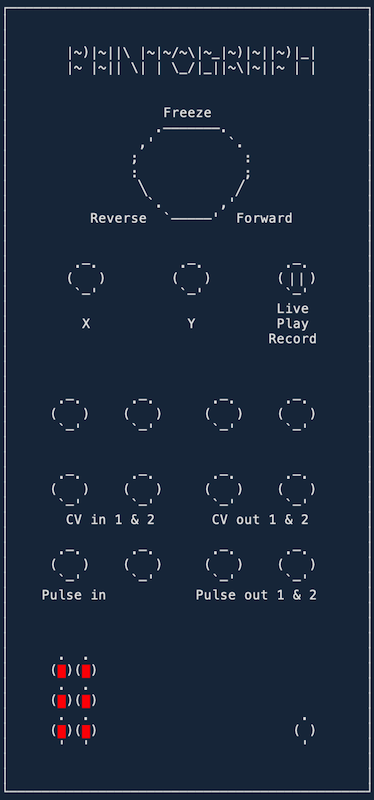
Controls
Switch
| Position | Mode | What it does |
|---|---|---|
| Up | Live | Audition — X/Y play live to the CV outs, CV-in summed on top |
| Middle | Play | Loop the recorded trace at Main-knob speed; X/Y knobs attenuate each trace |
| Down (hold) | Record | Hold to record a fresh trace; release to Middle to loop it |
Knobs
| Knob | Name | What it does |
|---|---|---|
| Main | Speed | Playback speed, bipolar — centre = freeze, left = reverse, right = faster |
| X | Trace X | Performance value in Live/Record; playback depth (attenuation) in Play |
| Y | Trace Y | Performance value in Live/Record; playback depth (attenuation) in Play |
Inputs & outputs
Inputs
| Jack | Name | What it does |
|---|---|---|
| CV In 1 | X Mod | Live CV summed onto the CV 1 output |
| CV In 2 | Y Mod | Live CV summed onto the CV 2 output |
| Pulse In 1 | Trigger | When patched, Play (Middle) becomes a one-shot: each rising edge retriggers. Unpatched = loop |
(Pulse In 2 and both Audio Inputs are unused.)
Outputs
| Jack | Name | What it does |
|---|---|---|
| CV Out 1 | Trace X CV | Trace X playback |
| CV Out 2 | Trace Y CV | Trace Y playback |
| Pulse Out 1 | End of Cycle | Trigger on every trace wraparound |
| Pulse Out 2 | Contour Gate | Gates high on Trace X's recorded shape |
(Both Audio Outputs are unused.)
LEDs
- Live: two 3-LED level bars (brightness = |output| per X/Y).
- Record: buffer-fill gauge (LEDs fill 1→6 as the recording approaches the ~75 s cap).
- Play: a moving position dot — reverses and freezes with speed, and holds on the last LED when a trigger finishes.
Building
Built with the Raspberry Pi Pico SDK (C++17), on the ComputerCard framework.
cmake -S . -B build -DPICO_SDK_PATH=/path/to/pico-sdk
cmake --build build --target pantograph -j4
Flash the resulting build/pantograph.uf2 by holding the Computer's boot button while
connecting USB (it mounts as RPI-RP2), then copy the .uf2 onto it.
Thanks
Written by Kenny Shen (qoelet/pantograph).
- Tom Whitwell for the Music Thing Workshop System.
- Chris Johnson for ComputerCard.