
84 Cosmik C1ZZL3
Stable phase-distortion synthesiser and Turing machine firmware with Web MIDI envelope readback, PD, detune, eight waveform families, hosted CZ patch import, USB MIDI device/host operation, and optional Turing MIDI output.
Panel
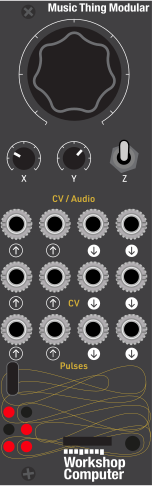 PitchPhase
DistortionWaveform
MorphPitch CVPhase
DistortionWave Control
CVExt Turing
ClockEnvelope
TrigOscillator 1
/ TuringOscillator 2
/ TuringStepped
Turing CVSmoothed
Turing CVMain Turing
PulseAlternate
Turing Pulse
Controls
Pitch
Oscillator pitch in synth mode
Phase Distortion
Phase-distortion amount
Waveform Morph
Waveform selection/morph
Inputs
Outputs
Pitch CV
1V/oct pitch modulation in PD synth mode
Phase Distortion
Adds phase-distortion amount in synth and Turing modes
Wave Control CV
Adds wave control in synth and Turing modes
Ext Turing Clock
External Turing clock in switch-up mode
Envelope Trig
Triggers selected envelope and oscillator sync in synth mode when preset is active
Oscillator 1 / Turing
Oscillator 1 in synth mode; self-playing stepped oscillator 1 in Turing mode
Oscillator 2 / Turing
Oscillator 2 in synth mode; self-playing stepped oscillator 2 in Turing mode
Stepped Turing CV
Scaled stepped Turing CV; continues updating in synth mode
Smoothed Turing CV
Smoothed Turing CV; continues updating in synth mode
Main Turing Pulse
Main Turing pulse; continues updating in synth mode
Alternate Turing Pulse
Alternate Turing bit pulse; continues updating in synth mode
LEDs
In synth mode: LED 1 shows phase-distortion amount, LED 2 shows waveform position, LED 3 shows oscillator 2 level, LED 4 shows ring modulation amount, LED 5 shows noise amount, and LED 6 lights while the switch is held down.
In Turing mode: LEDs 1-3 show low bits of the Turing pattern, LED 4 follows Pulse In 1, LED 5 shows sequence length, and LED 6 flashes on each Turing clock step.
In startup envelope selection: factory presets use the binary LED display, and custom slots light LED 6 and use LEDs 1-3 for the custom slot number.
README
C1ZZL3
Stable production firmware for the Cosmik C1ZZL3 Music Thing Modular Workshop Computer card.
C1ZZL3 is a dual phase-distortion synthesiser with custom Web MIDI envelopes, USB MIDI device/host support, optional Turing MIDI output, and a Turing machine mode with CV and pulse outputs.
For the user-facing card guide, see:
CARD_README.md
Stable Build
Current stable UF2:
uf2/C1ZZL3.uf2
Checksum:
12c356ad75d6d25fccab5060dbb057f1e3ed86169c2429a798c66f835825ed61
This is hardware-tested production release 1.1, promoted on 2026-07-06.
Release 1.1 works with Envelope Lab and C1ZZL3 Import Lab and includes Web MIDI PD, detune, eight waveform families, card-to-editor envelope readback, and browser CZ patch import handoff.
Current Stable Feature Set
- Phase-distortion synth voice.
- Factory envelopes plus eight protected custom envelope slots.
- Web MIDI envelope editor.
- Hosted CZ patch import workflow.
- USB MIDI device mode for DAW/browser use.
- USB MIDI host mode for class-compliant controllers.
- MIDI notes with envelope triggering.
- MIDI CC control with knob pickup handoff.
- Turing machine audio, CV, pulse, and optional MIDI note output.
- Turing CV and pulse outputs continue running in synth mode.
- Settings readback from the card into the Web MIDI editor.
- Ring, noise, MIDI channel, Turing range, and Turing MIDI settings persist.
Controls
Switch middle: synth mode.
- Main: pitch
- X: phase distortion
- Y: waveform
CV In 1: phase-distortion modulationCV In 2: waveform modulationPulse In 2: envelope trigger and oscillator sync
Switch down from middle: performance edit and save.
- Main: oscillator 2 detune
- X: ring modulation
- Y: noise/grit
Switch up: Turing mode.
- Main: mutation/lock
- X: sequence length, 2 to 16 steps
- Y: internal clock speed
Pulse In 1: external clockCV Out 1: stepped Turing CVCV Out 2: smoothed Turing CVPulse Out 1/2: Turing pulses
MIDI
MIDI CC controls on the selected input channel:
CC1: phase distortionCC20: oscillator 2 detuneCC21: ring modulationCC22: noise amountCC23: waveformCC24: Turing CV octave range, from 1 to 8 octaves
The physical knobs and MIDI CC controls share the same control values. After a CC change, the related knob must be swept through the current value before it takes over again.
Envelope Lab
Hosted editor:
https://tomwhitwell.github.io/Workshop_Computer/programs/84-cosmikc1zzl3/web/index.html
Local editor from this release folder:
python3 -m http.server 5173 --directory web
Open:
http://localhost:5173
Use Chrome or another browser with Web MIDI and SysEx support.
C1ZZL3 Import Lab
Hosted import lab:
https://tomwhitwell.github.io/Workshop_Computer/programs/84-cosmikc1zzl3/web/import/index.html
The Import Lab is included at web/import/index.html. It decodes Casio CZ
.syx patches into C1ZZL3 drafts, then hands the result to Envelope Lab for
final editing and sending. The navigation buttons at the top of both pages
switch between the two labs.
Current Import Lab features:
- Light and dark mode toggle matching the Envelope Lab palette.
- Larger
C1ZZL3 Import Labheader and a clearer guided import workflow. - Drag-and-drop or file-picker import for Casio CZ
.syxfiles. - Browser-side validation, patch summary, decoded data, and draft mapping.
- Draft handoff into Envelope Lab in a new tab for final editing and card send.
- Separate import page so CZ translation and envelope editing stay distinct.
Import Lab flow:
- Open
C1ZZL3 Import Lab. - Drop in or choose a Casio CZ patch file.
- Review the validation, decoded summary, warnings, and mapped draft.
- Use
Open In Envelope Labto carry the draft into the main editor. - In Envelope Lab, review the result, adjust if needed, and send or save it.
How To Use The Editor
- Pick a preset on the left, or add a custom one.
- Choose
AmplitudeorPhase Distortionto focus on one lane at a time. - Drag points on the graph to change both level and timing.
- Watch the point numbers. Matching numbers mean the stages are stacked at the same spot.
- Use the tables below the graph for exact values when you want precise edits.
- Use the action buttons on the right when you want to send, save, read, or reset.
Button quick reference:
Load RAM: send the envelope to the card until reset.Load Envelope + Settings: temporarily load the selected envelope and send all current settings in one action.Save Envelope: store the selected custom envelope in flash.Delete Envelope Slot: clear the selected custom slot from card flash.Read Envelopes from Card: load occupied card slots into the editor without overwriting changed local drafts.Read Settings from Card: pull the current performance settings into the editor.Send Settings: send the current performance settings to the card.Reset Preset: restore the selected preset to its factory value.
Load RAM, Load Envelope + Settings, and Send Settings are temporary.
Use Save Envelope to retain an envelope in flash. To make the current
performance settings the startup baseline, move the hardware switch from
middle to down and hold it until the card confirms the save.
The card can save up to eight custom envelopes. The browser can retain
additional local drafts. Factory presets are not overwritten.
Custom presets are labelled Local only, Saved - slot N, or Changed - slot N.
Envelope readback confirms which custom slots are occupied and verifies saves
and deletions when supported by the firmware.
Play loops a browser preview of the envelope.
Stop stops the browser preview only. It does not send a stop command to the
hardware.
Bounce is the reset preset because it shows the envelope shape clearly.
Mobile Web MIDI Notes
- Mobile browser support is less consistent than desktop support.
- If
MIDIconnects but no output appears, openDeveloper toolsin the editor and checkMIDI Ports Seen By Browser. - Some mobile browsers report MIDI access but expose ports in a non-standard way. The editor tries several detection paths, but browser/device support can still vary.
- If ports still do not appear, reconnect the device, reload the page, and try another USB adapter, hub, or browser.
Build
cmake -S . -B build
cmake --build build
The built UF2 will be:
build/C1ZZL3.uf2
The production source build currently reports:
FLASH: 138160 B
RAM: 146500 B
Stability Notes
This build is close to the practical processing limit of this RP2040 card format, so future changes should be tested carefully at maximum settings.
The stable version includes the lookup-table oscillator optimisation, 192 MHz clock, Turing MIDI output, settings readback, and full CC/knob pickup handoff. Tap tempo remains removed; Y is the Turing internal clock control.
Possible future optimisation notes are kept in:
FUTURE_NOTES.md