
75 Turing Clouds
Turing Machine-driven granular texture generator and rhythmic delay for the Workshop Computer
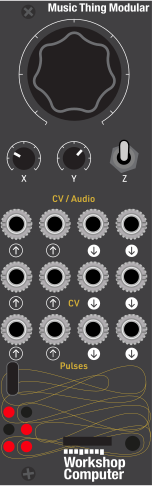
Panel
README
Turing Clouds
A granular texture generator for the Music Thing Modular Workshop Computer that combines a looping Turing Machine shift register with a four-grain cloud engine.
Source code and latest release: https://github.com/ainews1/turing_clouds
What It Does
Audio In 1 is continuously recorded into a 1-second buffer. A 16-bit Turing Machine decides when grains trigger and where in the buffer they read from. Because the Turing Machine loops, the cloud evolves in a semi-predictable way — familiar patterns that slowly mutate.
The card has three personalities selected by the switch:
- Up — Clouds: four independent grains create a dense, drifting texture.
- Middle — Delay: a single feedback-delay voice with the TM controlling tap timing.
- Down — Freeze: momentary freeze; the buffer stops recording and the current cloud decays/loops.
Panel Layout
Inputs
| Jack | Function |
|---|---|
| Pulse 1 | External clock for the Turing Machine |
| CV 1 | Grain size / delay feedback modulation |
| CV 2 | Buffer position / delay time modulation |
| Audio 1 | Source audio for the cloud/delay |
Outputs
| Jack | Function |
|---|---|
| Audio 1 | Cloud/delay mix output |
| Audio 2 | Raw cloud grains (stereo-ish aux) |
| CV 1 | Active grain count |
| CV 2 | Turing Machine register value |
| Pulse 1 | Clock output (mirrors TM trigger) |
Controls
| Control | Function |
|---|---|
| Main knob | Internal clock rate (no Pulse 1 cable) or TM loop length (external clock) |
| X knob | Turing Machine probability — fully looped to fully random |
| Y knob | Grain size in Clouds mode; feedback amount in Delay mode |
| Switch Up | Clouds mode |
| Switch Middle | Delay mode |
| Switch Down | Freeze (momentary) |
LEDs
The six LEDs display the top six bits of the Turing Machine register, giving a visual readout of the current pattern.
How It Works
- The Turing Machine is a 16-bit shift register. On each clock it either rotates the pattern left, or rotates and inverts the new bit based on the probability set by the X knob.
- Lower bits of the register trigger individual grains; upper bits choose a position in the 1-second audio buffer.
- Each grain plays a short segment with a triangular envelope. Grains overlap to create smooth clouds.
- In Delay mode the same mechanism is read as a single rhythmic tap delay with feedback.
Build
Prerequisites
- Raspberry Pi Pico SDK
- CMake 3.13+
- ARM GCC toolchain
Steps
cd ~/Workshop_Computer/releases/75_Turing_Clouds
mkdir build && cd build
cmake -G "Unix Makefiles" -DPICO_SDK_PATH=~/pico-sdk -DPICO_NO_PICOTOOL=1 ..
make -j4
python3 bin2uf2.py build/Turing_Clouds.bin build/Turing_Clouds.uf2
Copy Turing_Clouds.uf2 to the Workshop Computer by holding BOOTSEL while connecting USB.
License
MIT