
303 Acid
A deliberately slightly fiddly 16-step sequencer capturing some of the obtuse workflow of the original 303. Walk a cursor through the pattern, setting pitch and step type (rest / normal / accent / slide) per step. Pitch and step-type sequences can be independently phase-shifted and reset during playback.
Panel
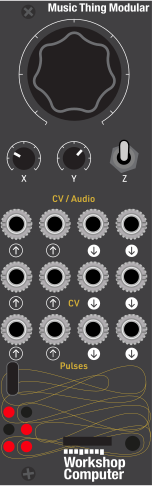 NoteOctaveStep ModePitch Phase
OffsetStep-type
Phase OffsetTransposePortamento
TimeExt ClockResetSawtooth
VoiceGatePitchAccent CVClockAccent Trig
Controls
Note
Semitone within the octave (0-11) for the step under the cursor
Octave
Octave offset (-2..+2) for the step under the cursor
Step Mode
Step type for the step under the cursor - rest / normal / accent / slide
Play: Runs the sequence, looping the active steps
Edit: Program the note and step type of the step under the cursor
Advance / Config: flick advances the edit cursor to next step; hold 1s to enter reset-mode
Inputs
Outputs
Pitch Phase Offset
Phase-shifts the pitch sequence
Step-type Phase Offset
Phase-shifts the step-type sequence
Transpose
Global transpose across the pattern
Portamento Time
Increase glide time
Ext Clock
One step per rising edge, overrides the internal tempo
Reset
Quantised reset based on selected reset-mode
Sawtooth Voice
Internal sawtooth oscillator tracking the sequenced pitch (no envelope)
Gate
~2ms trigger for normal/accent steps, held high on slide steps
Pitch
Calibrated 1V/oct pitch output, quantised to semitones, with portamento on slide
Accent CV
~5V on accented steps, 0V otherwise
Clock
Internal clock pulses, or the external clock when Pulse In 1 is connected
Accent Trig
~2ms trigger on accented steps
LEDs
Accent / Rest
Lit when the current step is accent or rest
Slide / Rest
Lit when the current step is slide or rest
README
acid
A 303 style step sequencer for the Music Thing Modular Workshop System Computer.
A deliberately slightly fiddly sequencer that hopefully captures some of the obtuse workflow of the original 303. Walk a cursor through a 16-step pattern, setting the pitch and step type of each step individually. Pitch and step-type can be independently phase-shifted and reset during playback.
The sequencer reuses the core of Moses Hoyt's drumdrum card — its tempo curve, clock/reset handling, knob pickup, momentary-switch timing and calibrated 1V/oct pitch output.
Controls
| Switch | Main knob | X knob | Y knob |
|---|---|---|---|
| Up (play) | Sequence length (1–16) | Swing (0–33%) | Tempo |
| Middle (edit) | Note within octave (semitone, 0–11) | Octave (-2..+2) | Step mode (rest / normal / accent / slide) |
| Down (short flick) | Advance the edit cursor to the next step | ||
| Down (hold ≥1s) | Change reset mode | Randomise pitches (large turn) | Randomise step types (large turn) |
Edit mode knobs use movement-latching: as soon as you move a knob enough from where it was when you landed on the step, it takes over. Flicking to the next step doesn't changes values until further knob movement.
Play mode knobs (length, swing, tempo) use pickup/catchup: a knob doesn't take over until you've moved it and it passes through the stored value.
Programming a pattern in edit mode
Set the Z switch to middle position to enter edit mode. The pattern starts as 16 copies of the default note (C2). To program it:
- Dial the note for the step under the cursor: Main sets the semitone, X sets the octave. CV Out 1 previews the note live and Audio Out 2 fires a short gate whenever you move the cursor or change the note with Main/X.
- Use the Y knob to set the step type. See below for modes.
- Flick the Z switch down to advance the cursor to the next step. It wraps around all 16 steps regardless of the play length.
- Repeat. Leave a step untouched to keep its current note.
Step modes (Y knob in edit mode)
| Y position | Mode | Gate | LED 4 | LED 5 |
|---|---|---|---|---|
| Full CCW (0–25%) | Rest | none | ● | ● |
| Centre-left (25–50%) | Normal | ~2 ms trigger | ○ | ○ |
| Centre-right (50–75%) | Accent | ~2 ms trigger + accent CV/trigger | ● | ○ |
| Full CW (75–100%) | Slide | held full step length (legato) | ○ | ● |
- Rest: no gate output.
- Accent: CV Out 2 goes high, Pulse Out 2 fires a ~2 ms trigger.
- Slide: the gate stays high for the entire step duration. CV Out 1 pitch/Audio Out 1 sawtooth slides to next step pitch value on the subsequent step.
Play mode
When the Z switch is in the up position the sequence runs, looping the active steps.
- Main sets the sequence length, 1–16. Shortening the loop truncates it — the steps past the length keep their notes, they just aren't played until you lengthen it again.
- X sets the swing amount, from 0% (straight 16ths, CCW) to ~33% (triplet swing, CW).
- Y sets the internal tempo (overridden when a clock is patched to Pulse In 1).
- CV In 1 transposes the whole pattern — ±2V gives the full ±12 semitones (tuned to roughly match the range of the Four Voltages module), voltage beyond ±2V loops back through the range.
Play Mode LEDs
| 0 1 |     LEDs 0–3 : current step number (0–15) in binary
| 2 3 |     LED 4    : lit in play mode
| 4 5 |     LED 5    : blinks with the gate
Two sequences: pitch and step type
Pitch and step type are programmed together, one step at a time, in edit mode — but during playback they can behave as two independent sequences:
- Audio In 1 phase-shifts the pitch sequence's read position, up to 15 steps ahead on +2V, up to 15 steps behind on -2V (0V/unplugged = no shift), looping back through the range beyond ±2V.
- Audio In 2 does the same for the step-type sequence (rest/normal/accent/slide), independently of the pitch shift.
- The result: patch a Four Voltages output to shift the pitch or step type for pattern variation.
Portamento (slide)
When the slide step type is selected, the CV out 1 pitch glides toward the next note for 21ms. Positive or negative voltage to CV In 2 slows down the glide time.
Reset-mode config menu (hold switch DOWN ≥1s)
Pulse In 2 is a reset for the running sequence, and its behaviour is selectable.
A reset trigger is quantised to the tempo: it doesn't move anything the instant it arrives, it just arms a reset that's applied on the next internal- or external-clock step boundary. Sending resets faster than the current tempo won't stall the clock — extra pulses before that boundary are simply ignored, and the sequence still steps forward normally.
Hold the switch DOWN for one second to enter the config menu (LEDs 0–2 show the currently selected mode in binary):
Main knob selects the reset mode:
- Reset both pitch and step-type to step 0
- Reset the pitch sequence to step 0 only — step type keeps running
- Reset the step-type sequence to step 0 only — pitch keeps running
- Reverse pitch — pitch sequence runs backwards when triggered, next trigger returns to normal
- Reverse step-type — step-type sequence runs backwards when triggered, next trigger returns to normal
X knob: a large turn randomises the pitch sequence.
Y knob: a large turn randomises the step-type sequence.
Release the switch to exit the menu and resume normal operation. A rising edge on Pulse In 2 then applies whichever reset mode is selected.
Jacks
| Jack | Function |
|---|---|
| Audio In 1 | Pitch-sequence phase offset — ±15 steps over ±2V, negative offsets backwards, loops beyond ±2V |
| Audio In 2 | Step-type-sequence phase offset — ±15 steps over ±2V, negative offsets backwards, loops beyond ±2V |
| Audio Out 1 | Internal sawtooth voice tracking pitch, unshaped (no envelope) |
| Audio Out 2 | Gate — ~2 ms for normal/accent steps, full step length for slide steps |
| CV In 1 | Global transpose, ±12 semitones over ±2V, loops beyond ±2V |
| CV In 2 | Portamento time — 0V/unplugged = 7.4 Hz (fastest); either direction from 0V slows it down |
| CV Out 1 | Pitch, calibrated 1V/oct, quantised to semitones |
| CV Out 2 | Accent CV — ~5V on accented steps, 0V otherwise |
| Pulse In 1 | External clock — one step per rising edge, overrides the internal tempo |
| Pulse In 2 | Reset — behaviour set by the reset-mode config menu |
| Pulse Out 1 | Clock — internal clock pulses, or the external clock mirrored straight through when Pulse In 1 is connected |
| Pulse Out 2 | Accent trigger — ~2 ms on accented steps |
Patch starters
Classic Acid Voice
CV Out 1     --> SineSquare 1 pitch input
Audio Out 2  --> Slope 1 signal input
Slope 1 out  --> Humpback 1 FM input         (slope shape switch in upward position/downward slope, loop switch set to middle/no loop)
SineSquare 1 square --> Humpback 1 audio in
Humpback 1 LP out   --> Mix channel 1
Tweak filter FM, resonance and slope time.
Accent Emphasis
Take above patch and use a stacking cable to patch CV Out 2 to the filter FM input for extra filter emphasis on accented steps.
You can also patch Pulse Out 2 to slope 2 input and patch that into the filter FM input for a shaped accent emphasis.
Sawtooth Voice
Audio Out 1 --> Humpback Filter 1 audio in
Audio Out 2 --> Slope 1 signal input
Varying Pitch and Rhythm
Four Voltages output   --> Audio In 1   (pitch sequence phase-shifts)
Four Voltages output   --> Audio In 2   (step-type sequence phase-shifts independently)
Use the four voltages buttons to shift the phase of the pitch and step type sequences to vary the pattern.
Building
Requires the Raspberry Pi Pico SDK.
mkdir build && cd build
cmake ..
make
Flash the resulting acid.uf2 to the Workshop Computer by holding BOOT while pressing
RESET, then dragging the file to the mounted USB drive.
Credits
Many thanks to:
- Moses Hoyt, the Sequencer core was adapted from drumdrum
- Chris Johnson for the Workshop Computer ComputerCard library
- Tom Whitwell for the Workshop System
License
MIT