
Panel
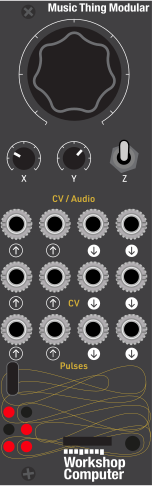 ClockMOD-WTimeAudio In
LeftAudio In
RightX CVY CVClock InUnusedAudio Out
LeftAudio Out
RightWeird
EnvelopeClocked LFOClock ThruActivity
Gate
Controls
Clock
CW fast/clean, CCW slow/crushed. Sets tempo and the wet engine's virtual sample rate. Mult/div of external clock when Pulse In 1 is patched.
MOD-W
Reverb smear / delay feedback; also morphs the CV Out 2 LFO shape
Time
Reverb decay / delay clock-division ladder; also CV Out 2 LFO phase
Reverb: Selects the reverb engine (tails crossfade on change)
Delay: Selects the delay engine (200ms commit; spring-return from down never selects it)
Freeze (momentary): Hold to cut input and recirculate the active engine at exact unity; release to decay
Inputs
Outputs
Audio In Left
Stereo audio input, left
Audio In Right
Stereo audio input, right (normalled to In 1 for mono sources)
X CV
Adds to the X knob (reverb smear / delay feedback, LFO shape)
Y CV
Adds to the Y knob (reverb decay / delay division, LFO phase)
Clock In
External clock; auto-detected, Main knob becomes mult/div
Unused
Not used
Audio Out Left
Stereo output, fixed 50/50 dry/wet
Audio Out Right
Stereo output, fixed 50/50 dry/wet
Weird Envelope
Envelope follower of the wet signal with level-dependent release and random wobble (unipolar)
Clocked LFO
One cycle per clock, hard-synced; shape from X, phase from Y (bipolar)
Clock Thru
Mirrors external clock, otherwise internal clock ticks
Activity Gate
Reverb: gate while tail is audible. Delay: trigger on each repeat.
README
COMET
A clocked lo-fi reverb and delay program card for the Music Thing Modular Workshop System Computer Written in fixed-point C++
Quick start
- Download
17_COMET.UF2 - Hold the Computer's boot button while powering on; it mounts as an
RPI-RP2drive. - Drag the UF2 onto the drive. The card reboots into MoodComputer.
Controls
Main knob = Clock. CW = fast/clean, CCW = slow/crushed. Internal clock runs 100 ms, 2 s. With a cable in Pulse In 1, the external clock is measured and Main becomes a mult/div ladder instead (×4 ×3 ×2 ×1.5 ×1 ×⅔ ×½ ×⅓ of the incoming rate).
X knob = MOD-W. Reverb: smear, random modulation of the tank read positions. Delay: feedback, up to gentle self-oscillation at the top. Also morphs the CV Out 2 LFO shape (sine - triangle - ramp - pulse).
Y knob = Time. Reverb: decay. Delay: division of the clock (1/8 · 1/6 · 1/4 · 1/3 · 1/2 · 3/4 · 1/1 · 3/2, with hysteresis). Also sets the CV Out 2 LFO phase offset.
Switch up = Reverb
Switch middle = Delay
Switch down (momentary) = Freeze, while held. Input is cut and the active engine recirculates reverb holds as an infinite drone, delay repeats loop losslessly. Release and it decays back at whatever Y is set to. Freeze stacks with the crush eg freeze something clean, then slow the clock and watch it pitch down.
Mode changes crossfade over ~13 ms and both engines keep running, so tails ring through a switch flip.
ins + outs
Audio In 1 / 2 Stereo input. In 2 is normalled to In 1 for mono sources.
Audio Out 1 / 2 Stereo output, fixed 50/50 dry/wet.
CV In 1 Adds to the X knob
CV In 2 Adds to the Y knob
Pulse In 1 External clock in (auto-detected; Main knob becomes mult/div)
CV Out 1 Weird envelope follower of the wet signal: fast attack, release that gets faster the louder it is, plus a slow random wobble. Bouncy, saggy, alive. Unipolar 0-5-ish V.
CV Out 2 Clocked LFO. One cycle per clock, hard-synced to each tick. Shape from X, phase from Y. Bipolar.
Pulse Out 1 Clock through mirrors an external clock, otherwise 10 ms internal clock ticks
Pulse Out 2 Reverb: gate high while the tail is audible. Delay: 15 ms trigger whenever a repeat happens (a real onset detector with a refractory period, not a timer).
LEDs
The six LEDs are a stereo VU meter on the outputs: left column (top/mid/bottom-left) is the left channel, right column the right channel, rising from the bottom row.